redis安装与使用
1. 环境准备:
| 节点 | ip |
|---|---|
| master | 192.168.1.243 |
| slave1 | 192.168.1.249 |
| slave2 | 192.168.1.250 |
2. 全部下载安装:
# yum install -y gcc gcc-c++ make openssl-devel pcre-devel
# cd /software
# wget  http://download.redis.io/releases/redis-6.2.5.tar.gz
# tar zxf redis-6.2.5.tar.gz && mv redis-6.2.5/ /usr/local/redis
# cd /usr/local/redis && make  MALLLOC=libc && make install
# echo $?
0
3. 全部配置成服务:
服务文件
# vim /usr/lib/systemd/system/redis.service

[Unit]
Description=Redis persistent key-value database
After=network.target
After=network-online.target
Wants=network-online.target

[Service]
ExecStart=/usr/local/bin/redis-server /usr/local/redis/redis.conf --supervised systemd
ExecStop=/usr/libexec/redis-shutdown
Type=notify
User=redis
Group=redis
RuntimeDirectory=redis
RuntimeDirectoryMode=0755

[Install]
WantedBy=multi-user.target
shutdown脚本
# vim /usr/libexec/redis-shutdown

#!/bin/bash
#
# Wrapper to close properly redis and sentinel
test x"$REDIS_DEBUG" != x && set -x

REDIS_CLI=/usr/local/bin/redis-cli

# Retrieve service name
SERVICE_NAME="$1"
if [ -z "$SERVICE_NAME" ]; then
   SERVICE_NAME=redis
fi

# Get the proper config file based on service name
CONFIG_FILE="/usr/local/redis/$SERVICE_NAME.conf"

# Use awk to retrieve host, port from config file
HOST=`awk '/^[[:blank:]]*bind/ { print $2 }' $CONFIG_FILE | tail -n1`
PORT=`awk '/^[[:blank:]]*port/ { print $2 }' $CONFIG_FILE | tail -n1`
PASS=`awk '/^[[:blank:]]*requirepass/ { print $2 }' $CONFIG_FILE | tail -n1`
SOCK=`awk '/^[[:blank:]]*unixsocket\s/ { print $2 }' $CONFIG_FILE | tail -n1`

# Just in case, use default host, port
HOST=${HOST:-127.0.0.1}
if [ "$SERVICE_NAME" = redis ]; then
    PORT=${PORT:-6379}
else
    PORT=${PORT:-26739}
fi

# Setup additional parameters
# e.g password-protected redis instances
[ -z "$PASS"  ] || ADDITIONAL_PARAMS="-a $PASS"

# shutdown the service properly
if [ -e "$SOCK" ] ; then
        $REDIS_CLI -s $SOCK $ADDITIONAL_PARAMS shutdown
else
        $REDIS_CLI -h $HOST -p $PORT $ADDITIONAL_PARAMS shutdown
fi
执行命令
# chmod +x /usr/libexec/redis-shutdown

# useradd -s /sbin/nologin redis

# chown -R redis:redis /usr/local/redis

# mkdir -p /data/redis

# chown -R redis:redis /data/redis

# yum install -y bash-completion && source /etc/profile                 #命令补全

# systemctl daemon-reload

# systemctl enable redis
4. 修改配置:
192.168.1.243
# vim /usr/local/redis/redis.conf

#监听ip,多个ip用空格分隔
bind 192.168.1.243
#允许后台启动
daemonize yes
#日志路径
logfile "/usr/local/redis/redis.log"
#数据库备份文件存放目录
dir /data/redis
#slave连接master密码,master可省略
masterauth njdys123
#设置master连接密码,slave可省略
requirepass njdys123

#在/data/redis/目录生成appendonly.aof文件,将每一次写操作请求都追加到appendonly.aof 文件中
appendonly yes

# echo 'vm.overcommit_memory=1' >> /etc/sysctl.conf

# sysctl -p
192.168.1.249
# vim /usr/local/redis/redis.conf

bind 192.168.1.249
daemonize yes
logfile "/usr/local/redis/redis.log"
dir /data/redis
replicaof 192.168.30.128 6379
masterauth njdys123
#requirepass njdys123
appendonly yes

# echo 'vm.overcommit_memory=1' >> /etc/sysctl.conf

# sysctl -p
192.168.1.250
# vim /usr/local/redis/redis.conf

bind 192.168.1.250
daemonize yes
logfile "/usr/local/redis/redis.log"
dir /data/redis
replicaof 192.168.30.128 6379
masterauth njdys123
#requirepass njdys123
appendonly yes

# echo 'vm.overcommit_memory=1' >> /etc/sysctl.conf

# sysctl -p
5. 全部启动redis:
# systemctl start redis
6. 启动错误
发现错误,6379端口被占用
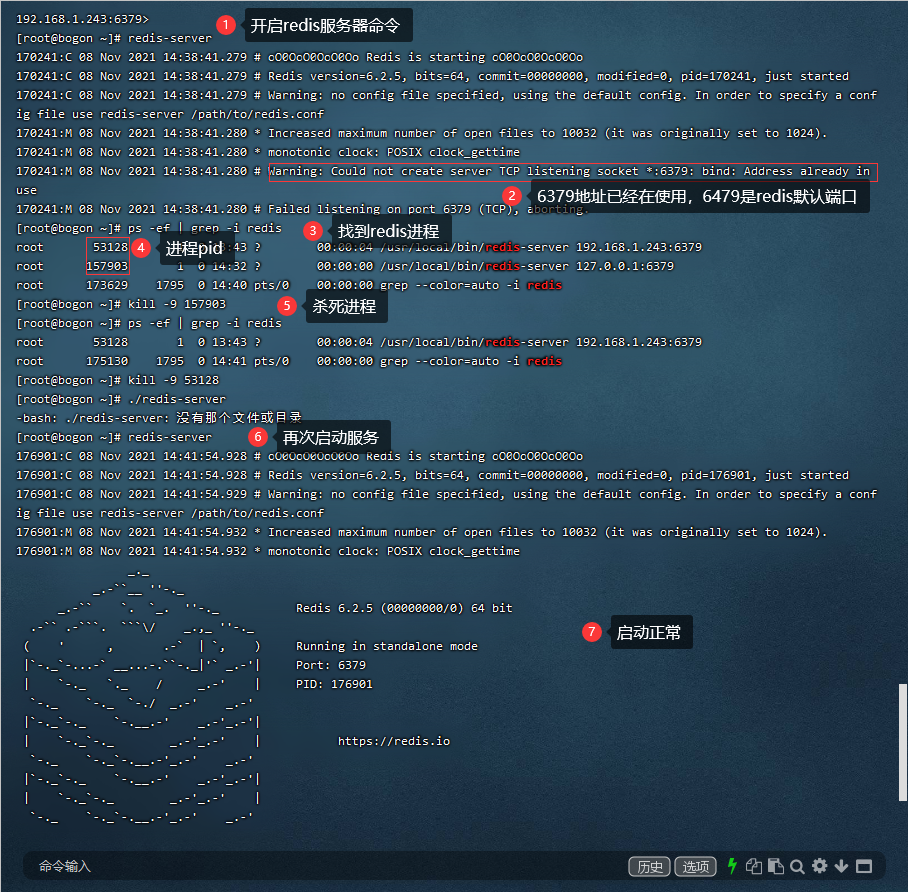
退出后重新执行命令
/usr/local/bin/redis-server /usr/local/redis/redis.conf --supervised systemd